Game Events are predefined in-game actions or outcomes. These events represent specific occurrences during gameplay (e.g., triggering a feature, hitting a win condition, collecting symbols) and are standardized across games to ensure consistent scoring logic.
See Supported Game Events for the full list of available events and what each one represents.
The Game Events API lets your system receive these events in real time. You subscribe to the event types you care about for specific games, and whenever a matching event occurs during play, a notification is delivered to your configured endpoint, letting you react to player activity as it happens.
- Subscribe: Configure which game events you want to receive for specific games
- Receive: Get real-time webhook notifications when subscribed events occur
- Process: Handle incoming webhook payloads in your system
Subscriptions are managed through the RubyPlay Public API. Use these endpoints to configure which game events you want to receive as webhooks.
| Method | Endpoint | Description |
|---|---|---|
| PUT | /api/v1/subscriptions/game-action-events | Create or update subscriptions |
| GET | /api/v1/subscriptions/game-action-events | View your current subscriptions |
| DELETE | /api/v1/subscriptions/game-action-events | Remove all subscriptions |
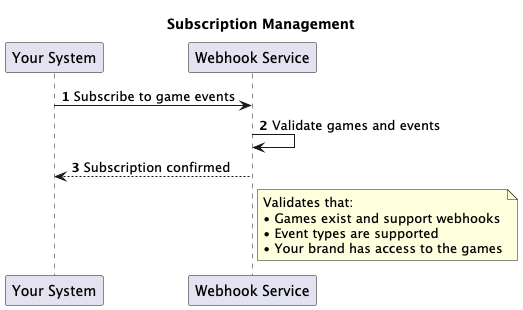
To receive events, your system must expose an HTTPS endpoint that accepts our webhook deliveries. See Implementing Your Webhook Endpoint for endpoint requirements, payload structure, response handling, and delivery and retry behavior.
When players interact with games, events are automatically processed and converted into webhook deliveries.
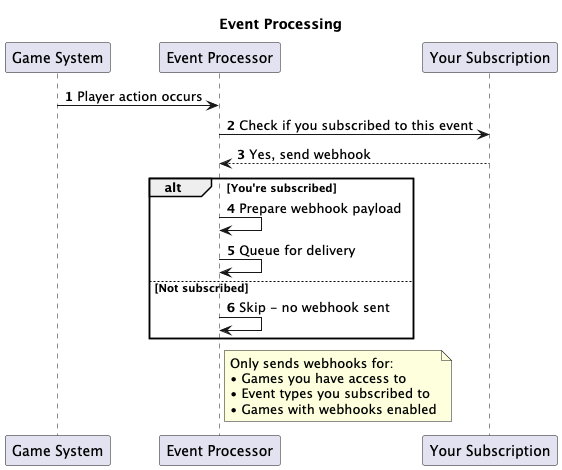
The system checks three criteria before sending webhooks:
- Your Access: You must have access to the specific game
- Your Subscription: You must be subscribed to the event type for that game
- Game Configuration: The game must have webhook events enabled
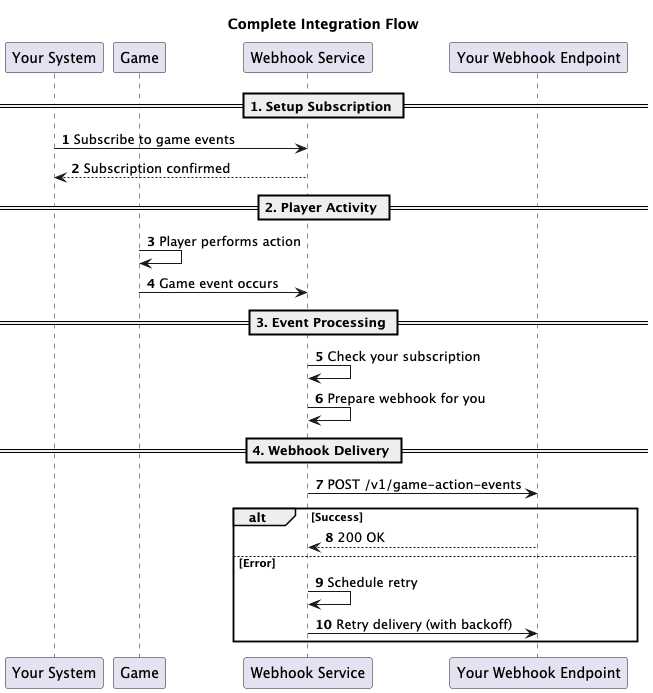
- Set up your webhook endpoint to receive POST requests (see Implementing Your Webhook Endpoint)
- Test your endpoint returns 200 OK for valid payloads
- Contact support to get your brand credentials and available games/events
- Create subscriptions using the API for games and events you want to monitor
- Monitor incoming webhooks and handle them in your system